Your agent just joined the delivery team
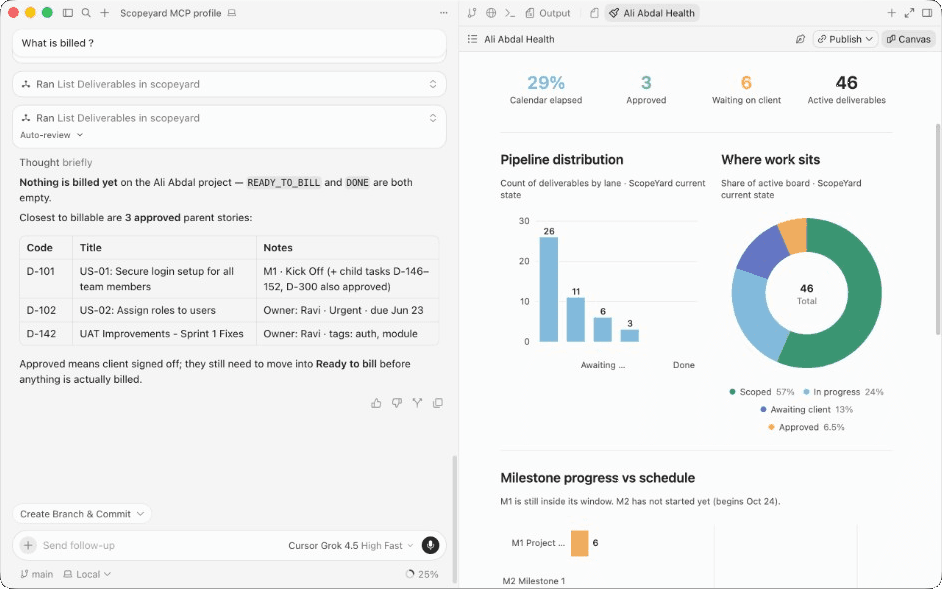
Connect Cursor, Claude, ChatGPT, Antigravity — or any MCP client — to Scopeyard with a single personal access token. From that moment on, your agent can run delivery and client reviews for you: moving deliverables, sending work for approval, checking project health, inviting teammates — all with exactly the same permissions you have in the web app.
No context switching. No copy-pasting statuses. Just ask.
“Send the homepage designs for client review and tell me what else is blocking the sprint.”
That’s it. That’s the workflow now.
Get started quickly with a personal access token
Connect in under two minutes — no OAuth dance, no app registration. And it’s built to be secure by design:
Security that matters when agents act on your behalf. Your agent is doing real work — approving deliverables, inviting people, touching client-facing projects. That’s exactly why access runs on personal access tokens instead of shared credentials. Your token is tied to you: it inherits your role and nothing more, so an agent can never overreach your own permissions. It’s never your password, it’s shown only once at creation, and you can revoke it instantly from Account settings the moment anything feels off — without locking yourself out. Every action your agent takes is your action, fully auditable, under your control.
1. Create a token.Sign in → Account → Personal access tokens. Copy it once — for your security, it’s never shown again.
2. Point your agent at Scopeyard. Choose your MCP client below — Account settings shows the same snippets with your token filled in. For Cursor and Claude Desktop, use the mcp-remote bridge (most reliable in production). For ChatGPT and Antigravity, use a direct HTTPS URL with Authorization: Bearer sy_pat_….
3. Say hello. Ask your agent “what can I do in Scopeyard?” or run the get_started prompt. The server greets you by name, with examples tailored to your role.
Use the mcp-remote bridge for Cursor — the most reliable way to connect to Scopeyard in production. Put your token only in AUTH_HEADER.
Use Agent mode. If a direct URL fails with net::ERR_FAILED, keep mcp-remote and switch Cursor Network to HTTP/1.
{
  "mcpServers": {
    "scopeyard": {
      "command": "npx",
      "args": [
        "-y",
        "mcp-remote@0.1.37",
        "https://www.scopeyard.io/api/mcp",
        "--header",
        "Authorization:${AUTH_HEADER}"
      ],
      "env": {
        "AUTH_HEADER": "Bearer PASTE_TOKEN_HERE"
      }
    }
  }
}Treat your token like a password.Store it in your MCP client’s config, never in shared repos or chat logs. If a token leaks, revoke it in Account settings and create a new one — takes seconds.
What your agent can do
Access always follows your Scopeyard role — your agent can never do more than you can. Clients can’t move board lanes or send work for review; they approve through client_approval, exactly like the portal.
For your agency team
Run the whole delivery loop without leaving your editor or chat. Draft a deliverable, move it across the board, fire it off for review, and pull a project health report — in one conversation.
“Create a deliverable for the onboarding flow, move it to In Progress, and invite dana@studio.com to the project.”
Tools: create, update, delete, and move deliverables · send for review · list org team · invite org and project members.
Prompts: get started · send for review · project health · invite people.
For your clients
Clients connect with their own token and see only what the portal allows — pending approvals, project status, billed work, and delivered assets. Approvals that used to sit in an inbox for days can now happen in one message.
“What’s waiting on my approval? Approve the brand guidelines — the rest can wait.”
Tools: list pending approvals · client approval · client project overview · list billed stories.
Prompts: client approval.
Shared reads, for everyone
Discover orgs and projects, open and search deliverables, browse feedback, sprints, milestones, delivered assets, and attachments — all available to both sides.
Tools: list organizations · list projects · get project · list/get/search deliverables · list delivered assets · list project team · get current user · get started.
Works with your favorite agent
If it speaks MCP, it speaks Scopeyard. Pick your client above for the exact config — Cursor and Claude use mcp-remote; ChatGPT and Antigravity use a direct URL + Bearer token.
- Cursor — ~/.cursor/mcp.json. Cursor MCP docs — Use Agent mode. If a direct URL fails with net::ERR_FAILED, keep mcp-remote and switch Cursor Network to HTTP/1.
- Claude Desktop — ~/Library/Application Support/Claude/claude_desktop_config.json (macOS). Claude MCP docs — Restart Claude Desktop after saving the config.
- Claude Code — Claude Code MCP settings / project config. Claude MCP docs
- ChatGPT — ChatGPT → Settings → Connectors (Developer mode). OpenAI MCP docs — Add a remote MCP connector with your server URL and Bearer token.
- Antigravity — mcp_config.json (serverUrl). Antigravity MCP setup
- Other MCP client — Your client’s MCP config file. MCP specification — Try mcp-remote first if your client supports stdio MCP servers.